
How to Bulk Import Outfits from Roblox Studio to the Bloxiana Dashboard
This guide will show you how to bulk import outfits from your Roblox games into the Bloxiana Dashboard when creating Pinterest posts. Bulk importing allows you to quickly send outfit data from Roblox Studio into Bloxiana, where you can review the imports, configure them, and queue them to be posted through our system.
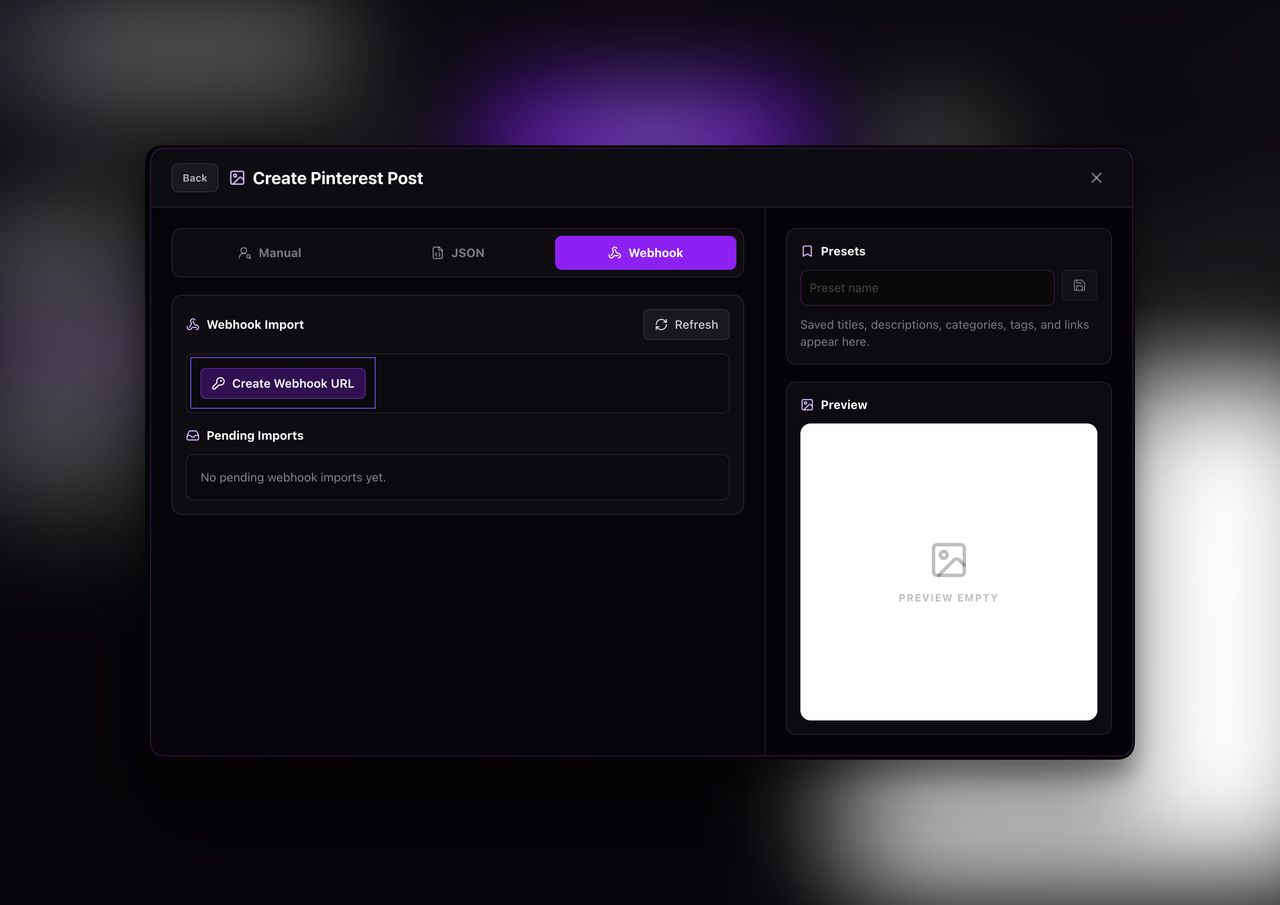
Step 1: Create a Webhook in Bloxiana
Create a new webhook that will be used for bulk importing outfits from Roblox Studio.
Once the webhook is created, copy the webhook URL. You will need to paste this URL into the Roblox Studio script.
Step 2: Prepare the Roblox Studio Script
Before running the script, you must update a few values.
Things you may need to change:
- Replace
PASTE_YOUR_BLOXIANA_WEBHOOK_URL_HEREwith the webhook URL you created on the Bloxiana dashboard. - Replace
ENTER_TITLEwith the Pinterest pin title you want all imported outfits to use. - Replace
ENTER_DESCRIPTIONwith the Pinterest pin description you want attached to the imports. - Replace
ENTER_LINKwith the external link users should be sent to when they click the Pinterest pin, such as your Roblox game, group, or profile. - Leave
MAX_IMPORT_ITEMS_PER_REQUEST = 100as-is unless you are specifically told to change it. - Make sure all replacement text stays inside the quotation marks.
For example:
local DEFAULT_TAGS = { "roblox", "outfits", "robloxavatar" }
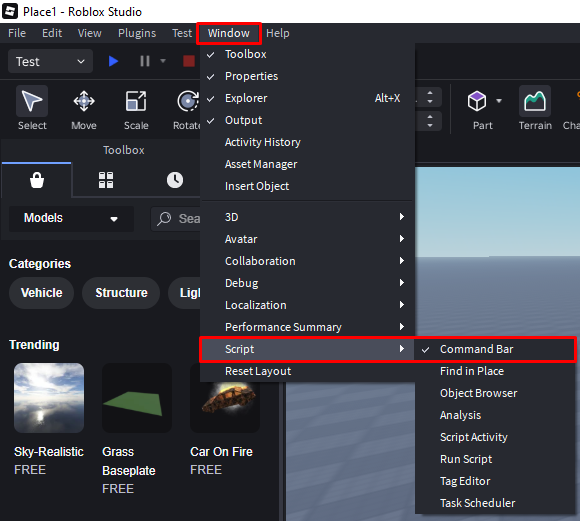
Step 4: Paste This Script into Roblox Studio
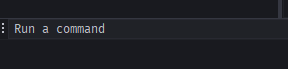
The script below includes the values that you need to update, after updating paste the script into your ROBLOX Studio Command Bar.
local ServerStorage = game:GetService("ServerStorage")
local HttpService = game:GetService("HttpService")
local Workspace = game:GetService("Workspace")

-- Paste the full Bloxiana webhook URL here.
-- Example:
-- https://bloxiana.lol/api/guilds/YOUR_GUILD_ID/pinterest/import-webhook/pwh_xxxxx
local ENDPOINT_URL = "PASTE_YOUR_BLOXIANA_WEBHOOK_URL_HERE"

local MAX_IMPORT_ITEMS_PER_REQUEST = 100

local DEFAULT_TITLE = "ENTER_TITLE"
local DEFAULT_DESCRIPTION = "ENTER_DESCRIPTION"
local DEFAULT_LINK = "ENTER_LINK"
local DEFAULT_TAGS = { "roblox" } -- to add more, do like: { "roblox", "tag2", "tag3" }

--------------------------------------------------------------------------------
-- OUTFITS FOLDER SETUP
-- This looks for the "Outfits" folder in Workspace first, then ServerStorage.
-- ADVICE: If your outfits folder uses a different name (e.g., "MyOutfits" or "ShopFits"),
-- change the string inside the FindFirstChild quotes below to match it exactly!
--------------------------------------------------------------------------------
local outfitsFolder = Workspace:FindFirstChild("Outfits") or ServerStorage:FindFirstChild("Outfits")
if not outfitsFolder then
	warn("No 'Outfits' folder found in Workspace or ServerStorage. Please create one.")
	return
end

if ENDPOINT_URL == "" or ENDPOINT_URL == "PASTE_YOUR_BLOXIANA_WEBHOOK_URL_HERE" then
	warn("Missing Bloxiana webhook URL. Set ENDPOINT_URL first.")
	return
end

local allOutfitsData = {}

local function clampNumber(value: number, minValue: number, maxValue: number): number
	return math.max(minValue, math.min(maxValue, value))
end

local function formatNumber(value: number): number
	return tonumber(string.format("%.2f", value)) or value
end

local function colorToHex(color: Color3): string
	local r = math.floor(clampNumber(color.R, 0, 1) * 255 + 0.5)
	local r_string = string.format("%02X", r)
	local g = math.floor(clampNumber(color.G, 0, 1) * 255 + 0.5)
	local g_string = string.format("%02X", g)
	local b = math.floor(clampNumber(color.B, 0, 1) * 255 + 0.5)
	local b_string = string.format("%02X", b)

	return "#" .. r_string .. g_string .. b_string
end

local function addAssetId(assetIds: { number }, assetId: number)
	if assetId ~= 0 then
		table.insert(assetIds, assetId)
	end
end

local function processHumanoidDescription(humanoidDescription: HumanoidDescription, rigType: Enum.HumanoidRigType)
	local assetIds: { number } = {}

	addAssetId(assetIds, humanoidDescription.Shirt)
	addAssetId(assetIds, humanoidDescription.Pants)
	addAssetId(assetIds, humanoidDescription.GraphicTShirt)

	addAssetId(assetIds, humanoidDescription.Head)
	addAssetId(assetIds, humanoidDescription.Torso)
	addAssetId(assetIds, humanoidDescription.LeftArm)
	addAssetId(assetIds, humanoidDescription.RightArm)
	addAssetId(assetIds, humanoidDescription.LeftLeg)
	addAssetId(assetIds, humanoidDescription.RightLeg)
	addAssetId(assetIds, humanoidDescription.Face)

	local accessories = humanoidDescription:GetAccessories(true)
	for _, accessoryInfo in ipairs(accessories) do
		if accessoryInfo.AssetId ~= 0 then
			table.insert(assetIds, accessoryInfo.AssetId)
		end
	end

	local assetIdStrings: { string } = {}
	for _, assetId in ipairs(assetIds) do
		table.insert(assetIdStrings, tostring(assetId))
	end

	if #assetIdStrings == 0 then
		return nil
	end

	local rigTypeString = (rigType == Enum.HumanoidRigType.R6) and "R6" or "R15"

	-- Scales only matter/exist safely for R15 rigs
	local scalesData = nil
	if rigTypeString == "R15" then
		scalesData = {
			height = formatNumber(clampNumber(humanoidDescription.HeightScale, 0.9, 1.05)),
			width = formatNumber(clampNumber(humanoidDescription.WidthScale, 0.7, 1)),
			head = formatNumber(clampNumber(humanoidDescription.HeadScale, 0.95, 1)),
			proportion = formatNumber(clampNumber(humanoidDescription.ProportionScale, 0, 1)),
		}
	end

	return {
		assetIds = table.concat(assetIdStrings, ","),
		rigType = rigTypeString,
		bodyColorHex = colorToHex(humanoidDescription.TorsoColor),
		scales = scalesData,
	}
end

local function getOutfitType(outfitSetCount: number): string
	if outfitSetCount == 1 then
		return " (Solo)"
	elseif outfitSetCount == 2 then
		return " (Duo)"
	elseif outfitSetCount >= 3 then
		return " (Trio)"
	end

	return ""
end

local function processOutfitHumanoid(outfitHumanoid: Humanoid, categoryName: string)
	local outfitSets = {}
	local humanoidDescriptions: { HumanoidDescription } = {}

	for _, child in ipairs(outfitHumanoid:GetChildren()) do
		if child:IsA("HumanoidDescription") then
			table.insert(humanoidDescriptions, child)
		end
	end

	table.sort(humanoidDescriptions, function(a, b)
		return a.Name < b.Name
	end)

	for _, humanoidDescription in ipairs(humanoidDescriptions) do
		if #outfitSets >= 4 then
			break
		end

		local outfitSet = processHumanoidDescription(humanoidDescription, outfitHumanoid.RigType)
		if outfitSet then
			table.insert(outfitSets, outfitSet)
		end
	end

	if #outfitSets == 0 then
		warn("Skipped outfit with no valid HumanoidDescription assets: " .. outfitHumanoid:GetFullName())
		return
	end

	local outfitType = getOutfitType(#outfitSets)

	table.insert(allOutfitsData, {
		category = categoryName .. outfitType,
		title = DEFAULT_TITLE,
		description = DEFAULT_DESCRIPTION,
		link = DEFAULT_LINK,
		tags = DEFAULT_TAGS,
		outfitSets = outfitSets,
	})
end

for _, descendant in ipairs(outfitsFolder:GetDescendants()) do
	if descendant:IsA("Humanoid") then
		if string.find(descendant.Name:lower(), "template") then
			continue
		end

		local parent = descendant.Parent
		local categoryName = "Girl"

		if parent and parent:IsA("Folder") and parent ~= outfitsFolder then
			categoryName = parent.Name
		end

		processOutfitHumanoid(descendant, categoryName)
	end
end

if #allOutfitsData == 0 then
	warn("No outfits were found to send.")
	return
end

local function sendBatch(batchData, batchIndex: number, totalBatches: number): boolean
	local jsonString = HttpService:JSONEncode(batchData)

	local success, response = pcall(function()
		return HttpService:RequestAsync({
			Url = ENDPOINT_URL,
			Method = "POST",
			Headers = {
				["Content-Type"] = "application/json",
			},
			Body = jsonString,
		})
	end)

	if not success then
		warn("Failed to send batch " .. batchIndex .. "/" .. totalBatches .. ": " .. tostring(response))
		return false
	end

	if not response.Success then
		warn(
			"Server rejected batch "
				.. batchIndex
				.. "/"
				.. totalBatches
				.. " | Status: "
				.. tostring(response.StatusCode)
				.. " | Body: "
				.. tostring(response.Body)
		)
		return false
	end

	print("Sent batch " .. batchIndex .. "/" .. totalBatches .. " successfully. Response: " .. tostring(response.Body))
	return true
end

local totalBatches = math.ceil(#allOutfitsData / MAX_IMPORT_ITEMS_PER_REQUEST)
local successfulBatches = 0

for batchIndex = 1, totalBatches do
	local batch = {}
	local startIndex = ((batchIndex - 1) * MAX_IMPORT_ITEMS_PER_REQUEST) + 1
	local endIndex = math.min(startIndex + MAX_IMPORT_ITEMS_PER_REQUEST - 1, #allOutfitsData)

	for index = startIndex, endIndex do
		table.insert(batch, allOutfitsData[index])
	end

	if sendBatch(batch, batchIndex, totalBatches) then
		successfulBatches += 1
	end

	task.wait(0.5)
end

print(
	"Finished sending Pinterest webhook imports. "
		.. successfulBatches
		.. "/"
		.. totalBatches
		.. " batches succeeded. Total outfits: "
		.. #allOutfitsData
)
Step 5: Refresh the Bloxiana Webhook Import Page
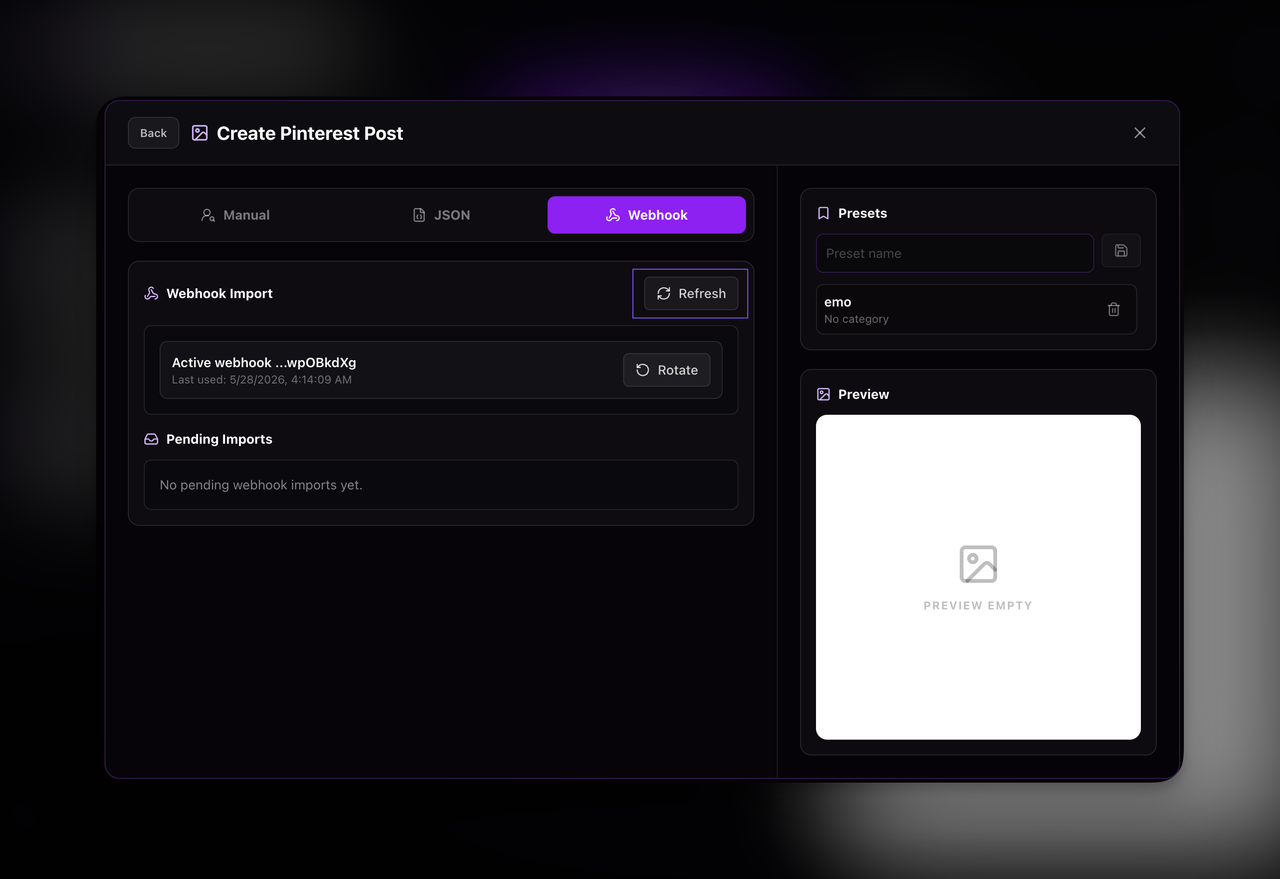
Go back to the Bloxiana Webhook Page.
Press Refresh.
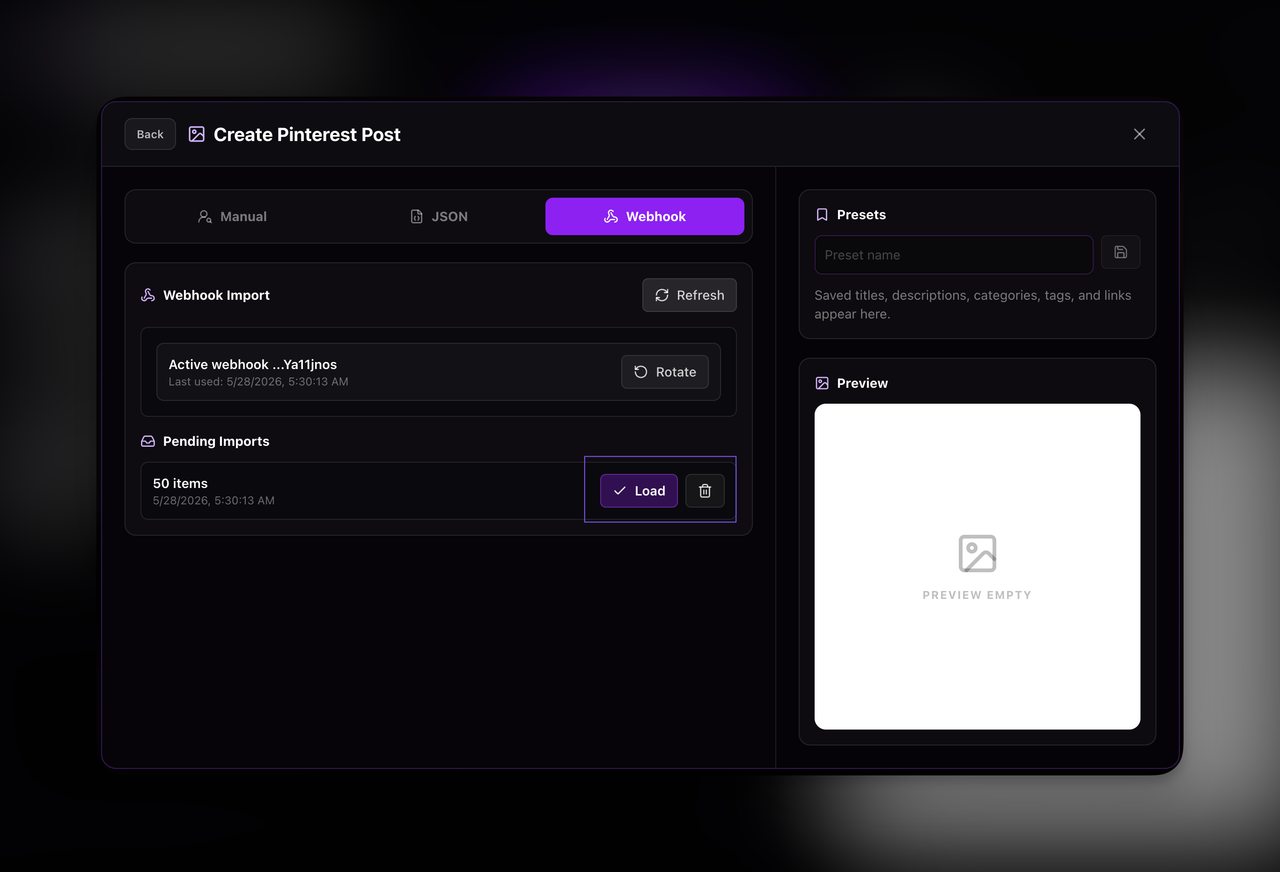
Your successful imports should appear under Pending Imports.
From there, press Load on the imports you want to bring into Bloxiana.
Troubleshooting
If the import does not work, check the following:
- Make sure the webhook URL was pasted correctly.
- Make sure the outfit folder is named
Outfits, or update the script to match your folder name. - Make sure your outfits are inside Workspace or ServerStorage.
- Make sure each outfit has valid HumanoidDescription assets.
- Make sure HTTP requests are enabled in Roblox Studio.
- Make sure you pressed Enter after pasting the script into the Command Bar.
Happy Importing!
Feel free to join our support server if you need help.


